zDuctulator1.0
Publisher Description
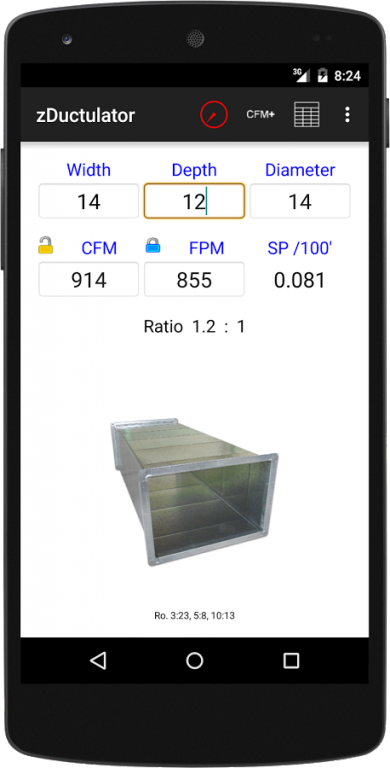
zDuctulator is a simple to use utility
designed for engineers, sheet metal
workers, HVAC professionals, and
students.
• Quickly size duct
• Automatically sizes duct branches
• and mains from a list of CFM
• values
• Easily review duct properties (CFM,
FPM, SP, & Aspect Ratio)
zDuctulator includes:
• A fully functional ductulator for sizing
• and designing HVAC systems
• A reference table for low pressure
and medium pressure duct sizes
• A CFM counter to size duct mains
and branches
• An easy to use hyperlinked help file
1.0 Ductulator
The ductulator can be used to easily find
either the equivalent diameter or the
equivalent rectangular sizes of duct. As
the size updates, the velocity (FPM), the
volume (CFM), and the friction loss (SP)
will also update automatically.
1.1 Equivalent Diameters
To find the equivalent diameter, enter the
Width and Depth dimensions of the
rectangular duct. The Diameter will update
automatically.
1.2 Rectangular Equivalent
To find the rectangular equivalent, enter
either the Width or Depth dimensions first,
then enter the Diameter. If you enter
he Depth first then the Diameter, the
Width will update. If you enter the Width
first then the Diameter, the Depth will
update.
1.3 Lock Buttons
The lock buttons allow you to lock either
the CFM value or the FPM value when
sizing duct. For example if you are sizing
duct based on a certain velocity, you can
lock the FPM value to get more accurate
information about the duct size. If you
are sizing duct to a specific volume, you
can lock the CFM value instead.
1.4 Aspect Ratios
The Ratio below the FPM indicates the
aspect ratio of the current rectangular
duct size. If the aspect ratio exceeds
3:1, the Ratio text as well as the Width
and Depth size text will display red as
a warning to review and revise the
rectangular size if possible.
2.0 CFM Counter
The CFM counter is a tool to quickly
total CFM for diffusers and get the
correct branch and main sizes to
design the system.
2.1 Set Friction Loss
To begin using the CFM counters, set the
friction loss (SP) at the top of the screen.
0.08 Is used as the default value.
2.2 Enter CFM
Enter the CFM for each diffuser, air device, or terminal, and
the Diameters for the branches will be
automatically calculated. The CFM for
the system will also be totaled and the
Main Duct size will be calculated in the
row above the first branch CFM.
2.3 Reset All Values
Click the RESET button to reset all
values to 0. The RESET button is at
the top right of the CFM+ screen.
3.0 Size Table
The Size Table is a quick reference
of low pressure and medium pressure
duct sizes and properties.
4.0 Value Ranges
For speed and simplicity, there are
value ranges for each data type that
can be freely entered.
4.1 Size Value Ranges
Width
Min: 1
Max: 500
Depth
Min: 1
Max: 500
Diameter
Min: 1
Max: 240
4.2 Setting Value Ranges
CFM
Min: 1
Max: 19573255
FPM
Min: 1
Max: 12000
Glossary
Ductulator - A Ductalator is an engineering
tool used by Sheetmetal workers, mechanical
engineers, and HVAC professionals to size
rectangular duct, size round duct, find CFM,
find FPM, & find friction loss. Typically
ductalaters are printed dial calculators
like the "Trane Ductulator" or the "Cook Duct
Designer". Ductulators are also known as
Duct Size Calculators, HVAC Tools, Duct
Designers, Duct Size Finder, CFM Finders.
About zDuctulator
The company that develops zDuctulator is Brandon Zeleniak. The latest version released by its developer is 1.0.
To install zDuctulator on your Android device, just click the green Continue To App button above to start the installation process. The app is listed on our website since 2015-09-07 and was downloaded 21 times. We have already checked if the download link is safe, however for your own protection we recommend that you scan the downloaded app with your antivirus. Your antivirus may detect the zDuctulator as malware as malware if the download link to com.bzeleniak.zductulator is broken.
How to install zDuctulator on your Android device:
- Click on the Continue To App button on our website. This will redirect you to Google Play.
- Once the zDuctulator is shown in the Google Play listing of your Android device, you can start its download and installation. Tap on the Install button located below the search bar and to the right of the app icon.
- A pop-up window with the permissions required by zDuctulator will be shown. Click on Accept to continue the process.
- zDuctulator will be downloaded onto your device, displaying a progress. Once the download completes, the installation will start and you'll get a notification after the installation is finished.
